
Dec
What Types of Workstation Power Sockets Are Available in Dubai?
 admin
admin
- 0
- 11 min read

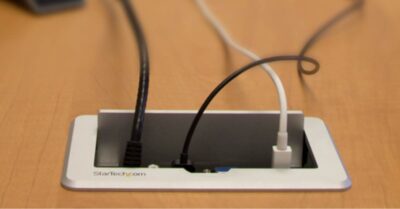
In Dubai, workstation power sockets come in various types, including standard electrical outlets, USB charging ports, and modular systems with data and HDMI connections. Many options also feature customizable designs to suit modern office setups and ergonomic needs. In the dynamic work environments of Dubai, the need for advanced and reliable power socket solutions has become more crucial than ever. Modern offices and workspaces require efficient and aesthetically pleasing workstation power sockets to ensure seamless connectivity and power distribution. These power solutions cater to various needs, from charging devices to powering high-end equipment, making them indispensable in today’s professional settings. This comprehensive guide explores the types of workstation power sockets available in Dubai, their features, applications, and how to choose the right one for your workspace. What Types of Workstation Power Sockets Are Available in Dubai? 1. Desktop Power Distribution Sockets Desktop power distribution sockets are among the most popular solutions for modern workstations in Dubai. These sockets are designed to be mounted on or integrated into desks, providing easy access to power. Features: Built-in USB Ports: Many models come equipped with USB-A and USB-C ports for charging mobile devices. Compact Design: These sockets are sleek and do not take up much space on the desk. Customizable Options: Users can choose configurations based on the number of outlets required. Applications: Ideal for personal desks, meeting rooms, and collaborative workspaces. Suitable for charging laptops, smartphones, and other low-power devices. Example Models: Pop-up sockets with retractable designs. Fixed desk grommets with power and data modules. 2. Workstation Floor Boxes Workstation floor boxes are embedded in the floor, offering a clean and organized look. These sockets are particularly useful in open-plan offices and collaborative areas. Features: Durable Construction: Made from robust materials to withstand foot traffic. Multiple Outlet Options: Includes standard power outlets, data ports, and HDMI connectors. Cable Management: Conceals wiring for a clutter-free environment. Applications: Suitable for conference rooms and workstations with multiple users. Commonly used in spaces where desks are frequently rearranged. Example Models: Modular floor boxes with interchangeable panels. Heavy-duty floor boxes for industrial applications. 3. Pop-Up Power Sockets Pop-up power sockets are designed to combine style with functionality. These sockets remain hidden until needed, enhancing the aesthetics of the workspace. Features: Sleek Design: Flush with the desk surface when not in use. One-Touch Operation: Pops up with a simple press. Multi-Functional Ports: Includes power, USB, and Ethernet ports. Applications: High-end corporate offices and executive workstations. Ideal for minimalist and modern office designs. Example Models: Motorized pop-up sockets for premium offices. Manual pop-up units with modular configurations. 4. Under-Desk Power Sockets Under-desk power sockets are discreet solutions that provide power without taking up desk space. These sockets are mounted beneath the desk and are easily accessible. Features: Hidden Installation: Keeps the desk surface clutter-free. Flexible Mounting Options: Can be attached using screws or adhesive strips. Multiple Outlet Configurations: Supports power, data, and USB connections. Applications: Ideal for shared workstations and hot-desking setups. Suitable for powering desktop computers and monitors. Example Models: Modular strips with power and data outlets. Compact units with surge protection. 5. Wall-Mounted Power Panels Wall-mounted power panels are versatile options for workstations that require multiple connections. These panels can be installed on walls or partitions near the workstation. Features: Wide Range of Ports: Includes power, HDMI, VGA, and USB connections. Customizable Layouts: Panels can be tailored to specific needs. High Durability: Built to withstand frequent use. Applications: Suitable for training rooms and conference areas. Used in collaborative spaces where multiple users require connectivity. Example Models: Modular panels for meeting rooms. High-capacity panels for multimedia setups. 6. Smart Power Sockets Smart power sockets integrate advanced technology to provide enhanced control and energy efficiency. These sockets can be managed remotely through apps or voice commands. Features: Wi-Fi Enabled: Allows users to control devices remotely. Energy Monitoring: Tracks power consumption in real-time. Schedule and Automation: Enables setting timers for connected devices. Applications: Ideal for tech-savvy offices and smart workspaces. Used in workstations with IoT-enabled devices. Example Models: Wi-Fi-enabled smart plugs with energy monitoring. Voice-activated sockets compatible with Alexa or Google Assistant. 7. Conference Table Connectivity Boxes These sockets are designed for boardrooms and meeting rooms where multiple devices need to be connected simultaneously. Features: Integrated Design: Blends seamlessly with conference tables. High Capacity: Supports multiple users at the same time. Versatile Ports: Includes power, USB, Ethernet, and AV connections. Applications: Used in corporate boardrooms and collaborative workspaces. Ideal for video conferencing and presentations. Example Models: Flip-top boxes with customizable ports. Motorized units with concealed wiring. 8. Portable Power Solutions Portable power sockets offer flexibility for workspaces that require mobility. These solutions are lightweight and easy to transport. Features: Compact Design: Easily fits in a bag or desk drawer. Battery Backup: Some models include built-in batteries. Universal Compatibility: Works with various device types. Applications: Perfect for freelancers and remote workers. Suitable for temporary workstations and outdoor setups. Example Models: USB-powered hubs for mobile devices. Portable power stations with AC and DC outlets. How to Choose the Right Workstation Power Socket in Dubai Workstation power sockets are essential for modern offices, ensuring seamless connectivity and efficient power distribution for various devices. Choosing the right solution can make a significant difference in productivity, safety, and aesthetics. Here’s a detailed guide to help you select the ideal workstation power sockets in Dubai. 1. Assess Your Needs Before purchasing workstation power sockets, it’s crucial to analyze your specific requirements. Here’s how: Determine Device Requirements Start by listing all the devices that will be connected. Consider computers, monitors, printers, chargers, and any additional office equipment that require power. This helps you decide the type and number of sockets needed. Analyze Workspace Layout Assess the layout of your workspace. Will the sockets be wall-mounted, desk-integrated, or floor-mounted? Understanding installation options ensures you choose a socket that fits seamlessly with your workspace design. Account for Usage Frequency If your workstation hosts multiple users or is in a high-traffic area, opt for durable and high-capacity sockets